
PaySorted for man and van and removals
Quote the move, hold the date, get paid
Send a quote with both addresses and the access at each end. Your customer picks their moving day and pays a deposit to hold it. On the day, the route is one tap away, and if it runs over, the extra time goes on the final invoice.
30 days free · no card needed · then from £14.99 a month

Video · 0:42
Watch a move, from quote to paid
Plays here from YouTube. More videos
How a job works
Quote, job, invoice, paid
One flow from the first call to the money in your bank.
Send a quote in a minute. They accept online with one tap, and can pay a deposit.
Give it to someone on your team. Photos, notes and hours kept with the job. Customers sign off extra work.
Turn the job into an invoice in one tap, with VAT worked out.
Card or Pay by Bank. Polite reminders until it is paid.
Real screens from the app
Built for moving days
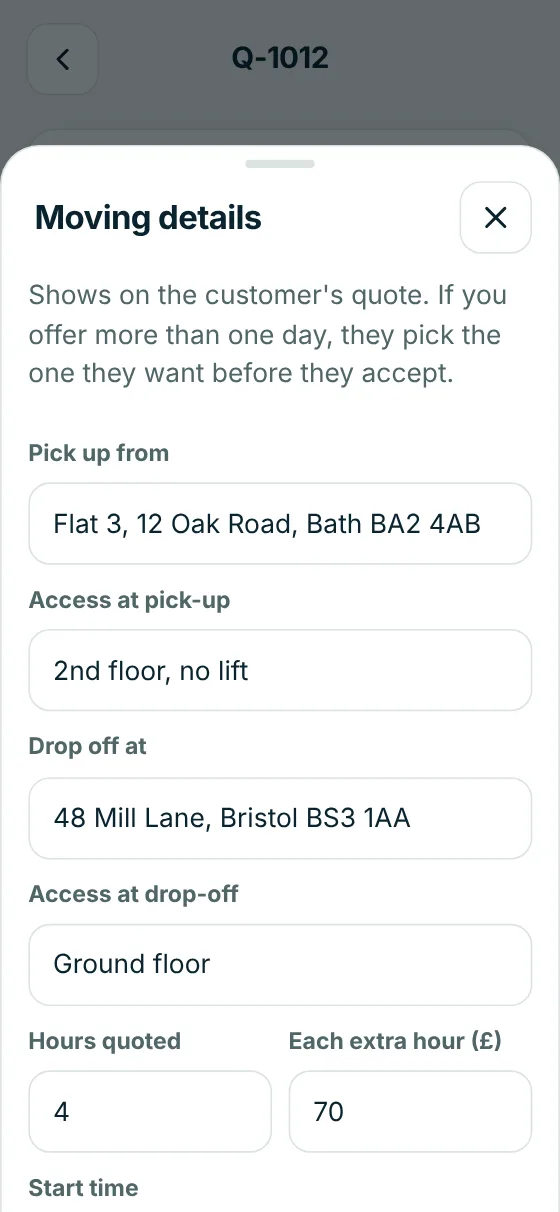
Quotes with both addresses
Pick-up and drop-off, the stairs and access at each end, the hours you've quoted and your rate for each extra hour.
- Your price list for vans, movers, materials and stairs
- Deposits on quotes, so the date is held
- Follow-ups if they go quiet
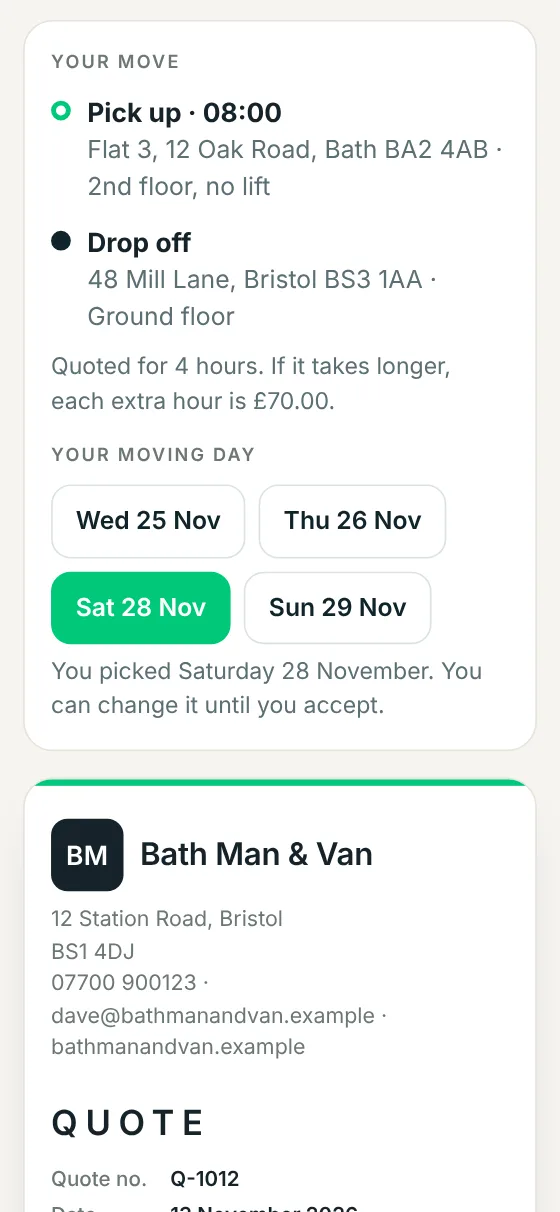
They pick their moving day
Offer the days you can do. Your customer picks one on their quote, then accepts and pays the deposit. You're told straight away.
- Card, Apple Pay or Pay by Bank
- The 14-day cancellation rules for home customers handled for you
- Their move details on the page they keep
On the day, and the final bill
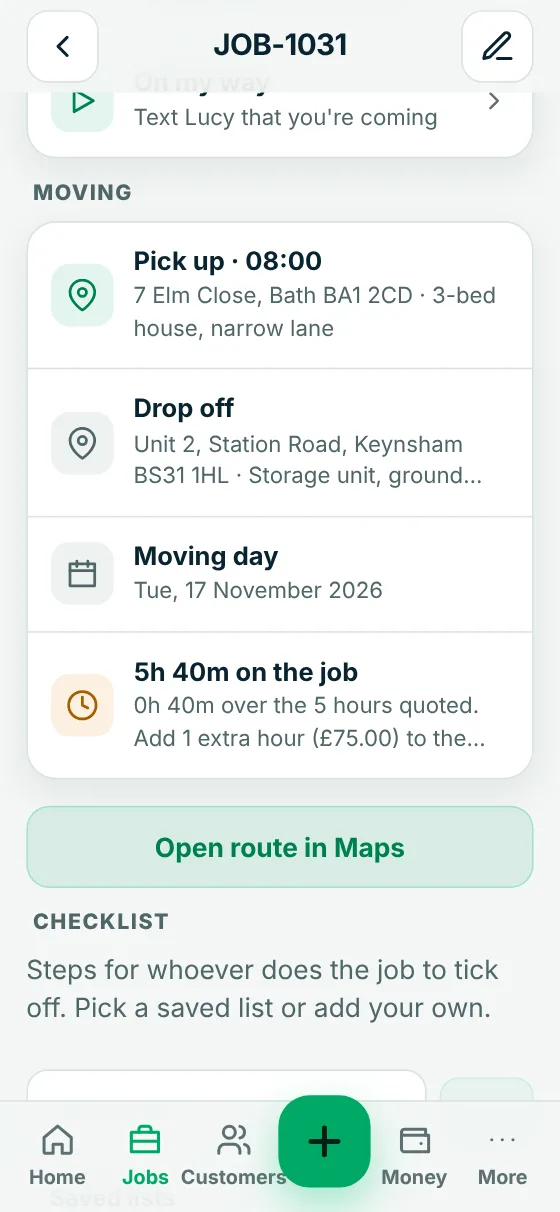
The route opens in Maps. Start the clock when you arrive and PaySorted tells you if it runs over the hours you quoted, and what to add for the extra time.
- Notes for the crew, like parking and what's not included
- Photos and sign-off kept with the job
- Turn it into the final invoice in one tap
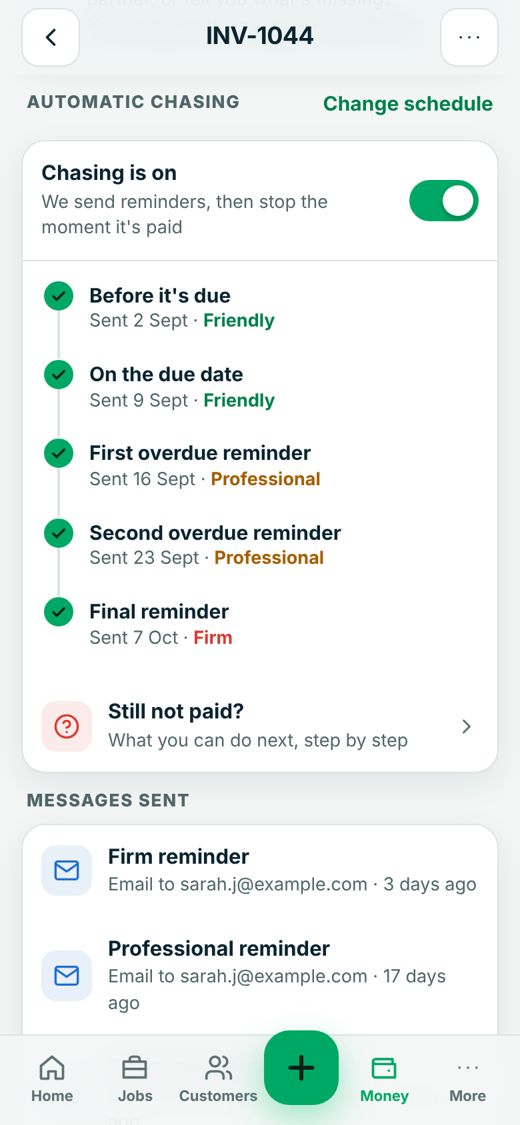
Chasing on autopilot
Friendly before it is due, firmer if it is late. Sent from your business name, and it stops the moment they pay.
- Email and text reminders
- Your own wording, or ours
- Never closer together than a week
Your brand, not ours
Your customers see your business, not PaySorted
When you first log in, add your logo and pick your colour. Or skip it and do it later in a minute. From then on everything wears your brand.
- Quotes, invoices, receipts and the payment page show your logo, your colour and your business name
- Quotes customers accept online carry your logo and details too
- Emails and reminders come from your business name, and replies go straight to you
- Inside the app too: your logo at the top and your colour on the buttons, for you and anyone who works with you
The only mention of us is a small "Sent with PaySorted" line at the bottom of invoices and emails.
Works with your accounts
Your accounts software stays up to date by itself
Connect once in Settings. New invoices, customers and payments copy across automatically, so nothing is typed twice and your accountant sees the same figures you do.
In PaySorted
- Invoices and credit notes
- Customers and their details
- Payments as they come in
both ways
Your accounts software
Unpaid invoices already in your accounts can be chased too.
Your accountant
- The same figures, no spreadsheets
- VAT and MTD quarter totals
- Free read-only access, with your OK
Free for your accountant
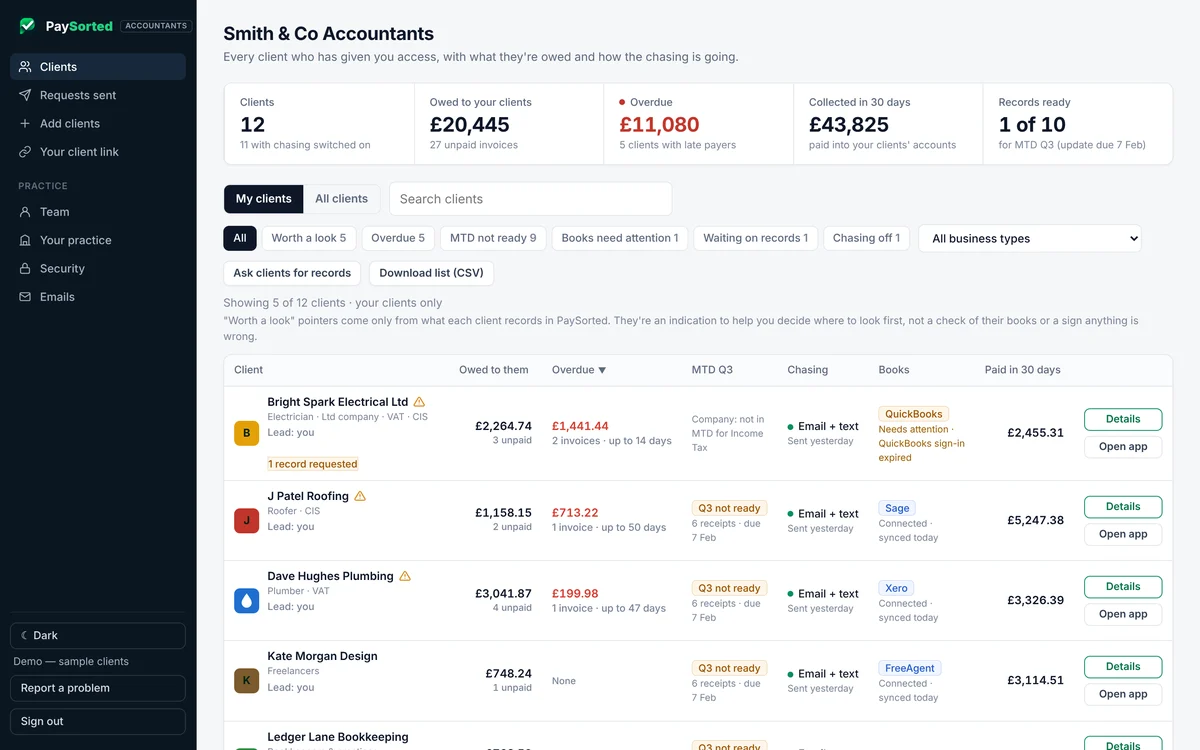
Your accountant sees it all, free
Invite your accountant or bookkeeper and they get their own read-only login at no cost, on every plan. They see what you're owed, your VAT figures and your quarter totals, and download a tidy pack at year end.
- Free on every plan, and it doesn't use one of your logins
- Read-only, and only with your agreement. You can remove it any time
- Period-end pack, who owes you, and VAT and MTD quarter figures in one download
Already using another app?
Bring your customers with you
Moving from another app or a spreadsheet? Download your customer list and bring it in yourself, or email it to support@paysorted.uk and we'll move your customers over for you, free. Unpaid invoices can come across too, and you choose which ones PaySorted chases. How to download your list from other apps.
Pricing
Plans for man and van and removals
30 days free with everything switched on. No card needed, no contract.
Starter
£14.99/month
- Quotes, jobs & invoices
- Card & bank payments
- Automatic email chasing
- Xero, QuickBooks, FreeAgent & Sage
- Your logo & colours
- 1 login (just you)
- Free access for your accountant
Pro
£24.99/month
- Everything in Starter
- Text reminders (100/month)
- Deposits on quotes
- Quote follow-ups & reviews
- Service reminders for repeat work
- 1 login (just you)
- Free access for your accountant
Business
£39.99/month
- Everything in Pro
- 5 logins for you and your staff (more at £8/month each)
- 300 texts/month
- Reports & exports in your app (your accountant's reports are free on every plan)
- Free access for your accountant
Logins are for you and people who work for you. Your accountant's access is free and separate. Compare every plan. Card payments are Stripe's standard rate (1.5% + 20p for a standard UK card) and we add nothing on top.
New this month
The day-to-day things, sorted
Small things that save you a phone call, every day.
Team job alerts
Give a job to someone and their phone pings. They only see their own work, never your prices or money.
Tomorrow's work, the evening before
Each person gets a summary of tomorrow's jobs at 6pm, so nobody is surprised in the morning.
On my way texts
One tap tells the customer you are 15 minutes away.
Booking confirmations and reminders
A confirmation when you book the job, and a reminder the evening before, sent by themselves.
Change my booking
Customers ask to move a job from a link in their reminder. You say yes or no.
Job checklists
Saved lists for each type of job. The team ticks them off on their phone.
Quote kits
Save a bundle of lines, like a van, two movers and packing materials, and add it to a quote in one tap.
Customer credit
Money paid in advance or overpaid is kept on account and taken off the next bill.
Time off
Log holidays and sick days. You get a warning before giving a job to someone who is off.
Message the team
One message to everyone, or just who is working today.
Tips
Customers can add a tip after paying by card. It goes straight to you. Off unless you switch it on.
Hide what you don't need
Sections on the home screen can be minimised if they aren't part of your work.
Works like an app, even with poor signal
Install it from the browser in seconds. Today's jobs are saved on the phone, so a patch of poor signal doesn't stop you.
Your brand, not ours
Your logo and colour on everything your customers see. Choose logo only, logo and buttons, or full colours inside the app too. Try it on the demo first.
Common questions
Will my customers see PaySorted?
Hardly at all. Invoices, the payment page, receipts and reminders show your logo, your colour and your business name, and emails come from your name with replies going to you. There's a small "Sent with PaySorted" line at the bottom.
Can I invoice straight from the job?
Yes. Pick the customer, type what you did and the price, and tap Send. They get it by email or text with a "Pay now" button for card, Apple Pay, Google Pay or Pay by Bank.
Can my team see their own jobs?
Yes, on the Business plan. Give each job to someone in the diary. Field staff only see the jobs you give them, with no prices or invoices, and can log their hours on each job.
Do I need to be VAT registered?
No. If you're not, your invoices show no VAT and say so. If you are, add your VAT number and VAT is shown properly on every invoice.
What if a landlord or letting agent is paying?
Add them as the customer and put the property as the site address. The invoice shows both, and reminders go to whoever is paying.
Starting out, or checking your registrations? Our free Education centre has the licences, registrations, training and trade bodies for trades, plus guides to getting paid.