
PaySorted Events for event suppliers
Bookings, contracts and balances, handled
Every booking with its date, venue, contract and payment plan. Clients sign online, pay the deposit and balance on time, and you never have to chase before the big day.
30 days free · no card needed · then from £8.99 a month

Video · 0:42
Watch a booking, from enquiry to balance paid
Plays here from YouTube. More videos
Real screens from the app
From enquiry to the big day
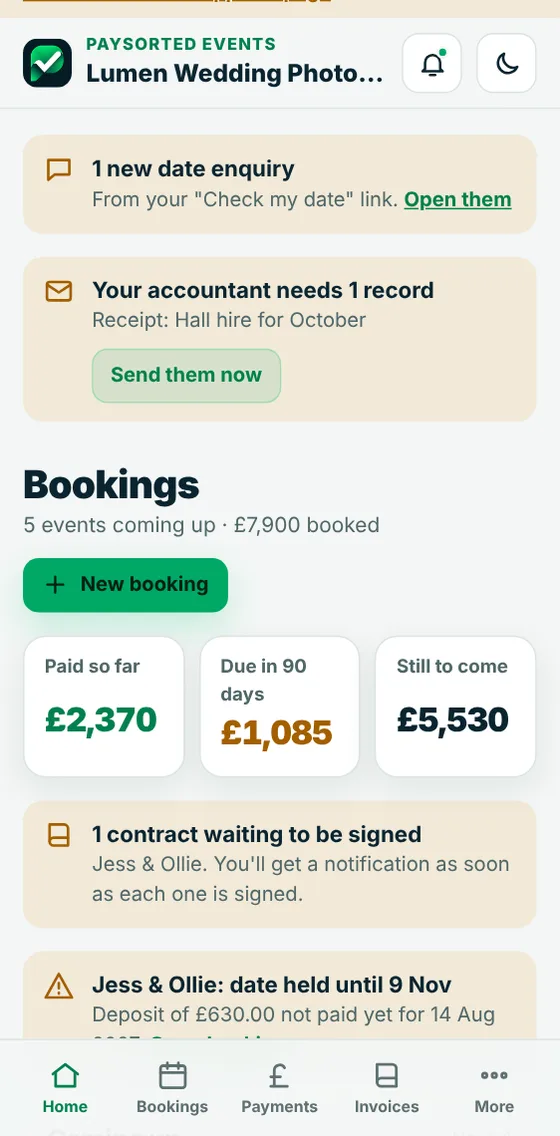
Every booking at a glance
Dates, clients, venues and what's still to come in. Send a proposal with your packages and add-ons: they choose, tick any extras and accept online.
- "Check my date" enquiry link
- Proposals with packages and add-ons
- A warning before you double book
- Add bookings to your calendar
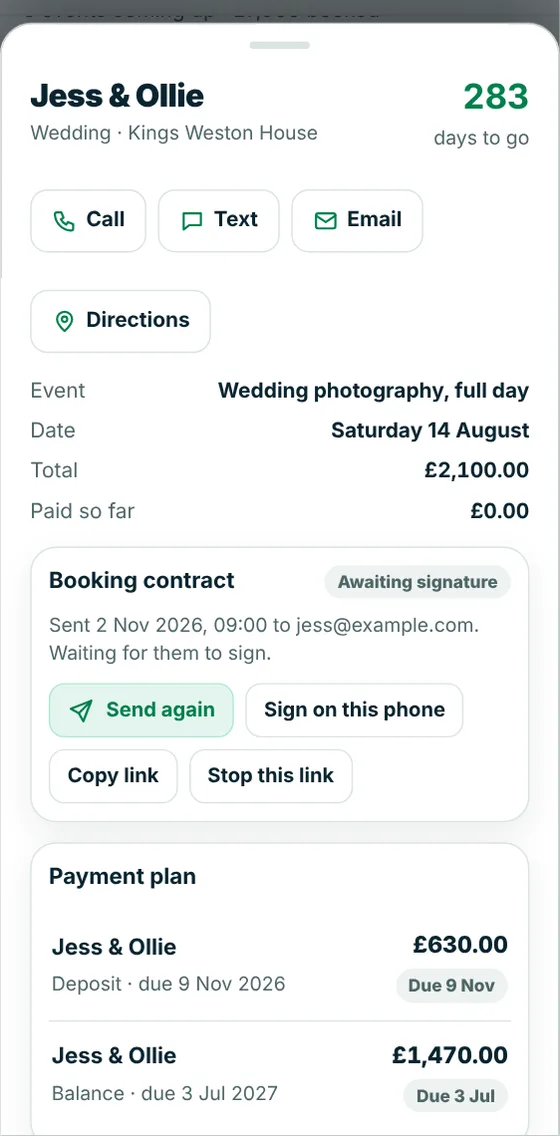
Contracts and payment plans
Send the booking contract to sign online, then a payment plan that collects itself: a deposit and balance, monthly payments, or your own dates.
- Signed contracts kept with the booking
- Monthly payments or your own dates
- Planning questionnaires filled in online
- Reminders before each payment is due
Your brand, not ours
Your clients see your business, not PaySorted
When you first log in, add your logo and pick your colour. Or skip it and do it later in a minute. From then on everything wears your brand.
- Quotes, contracts, invoices and the payment page show your logo, your colour and your business name
- Proposals and contracts your clients sign online carry your brand too
- Emails and reminders come from your business name, and replies go straight to you
- Inside the app too: your logo at the top and your colour on the buttons, for you and anyone who works with you
The only mention of us is a small "Sent with PaySorted" line at the bottom of invoices and emails.
Works with your accounts
Your accounts software stays up to date by itself
Connect once in Settings. New invoices, clients and payments copy across automatically, so nothing is typed twice and your accountant sees the same figures you do.
In PaySorted
- Deposit and balance invoices
- Clients and their details
- Payments as they come in
both ways
Your accounts software
Unpaid invoices already in your accounts can be chased too.
Your accountant
- The same figures, no spreadsheets
- VAT and MTD quarter totals
- Free read-only access, with your OK
Free for your accountant
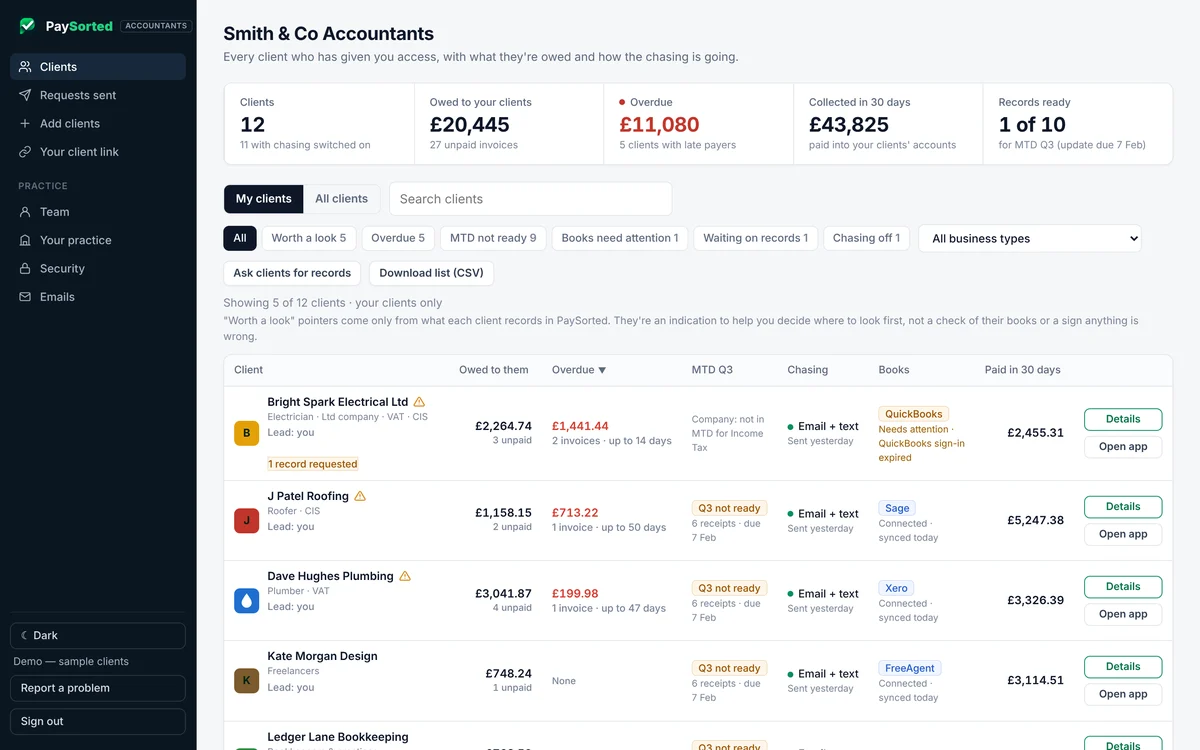
Your accountant sees it all, free
Invite your accountant or bookkeeper and they get their own read-only login at no cost, on every plan. They see what you're owed, your VAT figures and your quarter totals, and download a tidy pack at year end.
- Free on every plan, and it doesn't use one of your logins
- Read-only, and only with your agreement. You can remove it any time
- Period-end pack, who owes you, and VAT and MTD quarter figures in one download
Already using another app?
Bring your clients with you
Moving from another app or a spreadsheet? Download your client list and bring it in yourself, or email it to support@paysorted.uk and we'll move your clients over for you, free. Unpaid invoices can come across too, and you choose which ones PaySorted chases. How to download your list from other apps.
Pricing
Plans for event suppliers
30 days free with everything switched on. No card needed, no contract.
Solo
£8.99/month
- One supplier, up to 300 clients
- Any number of bookings
- Deposit and balance plans
- Automatic email reminders
- Card and bank payments
- Free access for your accountant
Studio
£17.99/month
- Everything in Solo
- Unlimited clients
- 3 logins for you and your team
- Extra logins £4 a month each
- Text reminders as well as email (100 a month)
Business
£39.99/month
- Everything in Studio
- Unlimited clients
- 5 logins, extra logins £4 a month each
- Text reminders as well as email (300 a month)
Logins are for you and people who work for you. Your accountant's access is free and separate. Compare every plan. Card payments are Stripe's standard rate (1.5% + 20p for a standard UK card) and we add nothing on top.
New this month
The day-to-day things, sorted
Small things that save you a phone call, every day.
Book a call link
New clients pick a free time for a call from your link. You get their details straight away.
Run sheets
The timings for the day, kept on the booking and shared with your team.
Saved replies
Your best answers to enquiries, bookings and thank-yous, ready to send.
Time off
Log holidays and sick days. You get a warning before giving a booking to someone who is off.
Message the team
One message to everyone, or just who is working today.
Tips
Clients can add a tip after paying by card. It goes straight to you. Off unless you switch it on.
Works like an app, even with poor signal
Install it from the browser in seconds. Today's bookings are saved on the phone, so a patch of poor signal doesn't stop you.
Your brand, not ours
Your logo and colour on everything your clients see. Choose logo only, logo and buttons, or full colours inside the app too. Try it on the demo first.
Common questions
Will my clients see PaySorted?
Hardly at all. Invoices, the payment page, receipts and reminders show your logo, your colour and your business name, and emails come from your name with replies going to you. The only mention is a small "Sent with PaySorted" line at the bottom.
Can clients sign my booking contract online?
Yes. Write your booking terms once and they go with every deposit invoice. Clients read them, type their name and sign with a finger or mouse. You both get a copy, and the signed date, time and device are kept as a record.
What if the event date changes?
Move it in the booking and the unpaid balance and its reminders move with it.
Can I take payments in stages?
Yes: a deposit and a balance, a deposit then monthly payments, or your own dates and amounts. Each payment has its own invoice and due date, with a reminder before it's due.
Can clients choose a package and accept online?
Yes. Save your packages and add-ons once, then send a proposal. They choose a package, tick any extras and accept. The booking goes straight in, and you confirm it to send the contract and deposit invoice.
What if they never pay the deposit?
You choose how long to hold the date. When the hold ends, we tell you and you decide what to do.
Do reminders go out right before the event?
No. The last one goes out well before, so nobody is chased in the final week.
Can I see the app with my own logo and colours before I sign up?
Yes. Open the demo and tap "Try your brand". Add your name, logo and colour and the whole demo changes to match, including what your clients see. You choose whether the app changes fully, just the buttons, or only shows your logo. Nothing is uploaded.
Do I need to download it from an app store?
No. PaySorted runs in your phone's browser and installs to your home screen in a few seconds, like any other app. It opens full screen, and keeps today's bookings on your phone if you lose signal.
Take the stress out of bookings
Free for 30 days. No card, no contract.
Starting out, or checking your registrations? Our free Education centre has the licences, registrations, training and trade bodies for event suppliers, plus guides to getting paid.